

Install Exponential Desktop
Supported systems
Section titled “Supported systems”| Distribution | Version | Suite | Xwayland |
|---|---|---|---|
| Ubuntu | 24.04 | noble |
bundled 24.1 |
| Linux Mint | 22 | noble |
bundled 24.1 |
| Ubuntu | 26.04 | resolute |
the distribution’s |
| Debian | 13 | trixie |
the distribution’s |
| Fedora | 44, 45 | the distribution’s | |
| Arch Linux | rolling | the distribution’s |
Ubuntu 24.04 and Mint 22 ship Xwayland 23.2, which has no explicit sync, so the package brings its own 24.1.
Install
Section titled “Install”Every repository is signed with one key, exponential.asc:
B7E6 5605 732E F036 4DB1 F80C 3767 30B0 A802 8ADCcurl -fsSL https://exponential.at/desktop/setup.sh | sudo shOr add the repository by hand: the key, then /etc/apt/sources.list.d/exponential.sources.
sudo install -d -m 0755 /etc/apt/keyringscurl -fsSL https://pkg.exponential.at/exponential.asc | sudo tee /etc/apt/keyrings/exponential.asc > /dev/nullTypes: debURIs: https://pkg.exponential.at/aptSuites: nobleComponents: mainSigned-By: /etc/apt/keyrings/exponential.ascTypes: debURIs: https://pkg.exponential.at/aptSuites: resoluteComponents: mainSigned-By: /etc/apt/keyrings/exponential.ascsudo apt update && sudo apt install exponential-desktop exponential-repocurl -fsSL https://exponential.at/desktop/setup.sh | sudo shOr add the repository by hand: the key, then /etc/apt/sources.list.d/exponential.sources.
sudo install -d -m 0755 /etc/apt/keyringscurl -fsSL https://pkg.exponential.at/exponential.asc | sudo tee /etc/apt/keyrings/exponential.asc > /dev/nullTypes: debURIs: https://pkg.exponential.at/aptSuites: trixieComponents: mainSigned-By: /etc/apt/keyrings/exponential.ascsudo apt update && sudo apt install exponential-desktop exponential-repocurl -fsSL https://exponential.at/desktop/setup.sh | sudo shOr by hand:
sudo dnf config-manager addrepo --from-repofile=https://pkg.exponential.at/rpm/exponential.reposudo dnf install exponential-desktop exponential-repocurl -fsSL https://exponential.at/desktop/setup.sh | sudo shOr by hand:
- Add the repository: its mirrorlist, then a section in
/etc/pacman.conf.Terminal window echo 'Server = https://pkg.exponential.at/arch/$arch' | sudo tee /etc/pacman.d/exponential-mirrorlist/etc/pacman.conf [exponential]Include = /etc/pacman.d/exponential-mirrorlist - Import the key and sign it locally.
Terminal window curl -fsSL https://pkg.exponential.at/exponential.asc | sudo pacman-key --add -sudo pacman-key --lsign-key B7E65605732EF0364DB1F80C376730B0A8028ADC - Install.
Terminal window sudo pacman -Sy exponential-desktop exponential-repo
First login
Section titled “First login”Log out and pick Exponential in the login screen’s session menu.
 Exponential (safe mode) starts with the factory settings and leaves your configuration untouched.
Updates arrive through your package manager. A running session keeps running; the new version starts at the next login. exponential-repo keeps the repository entry and key current.
Check the machine
Section titled “Check the machine”exponential-compositor doctorSettings shows the same checks under About:
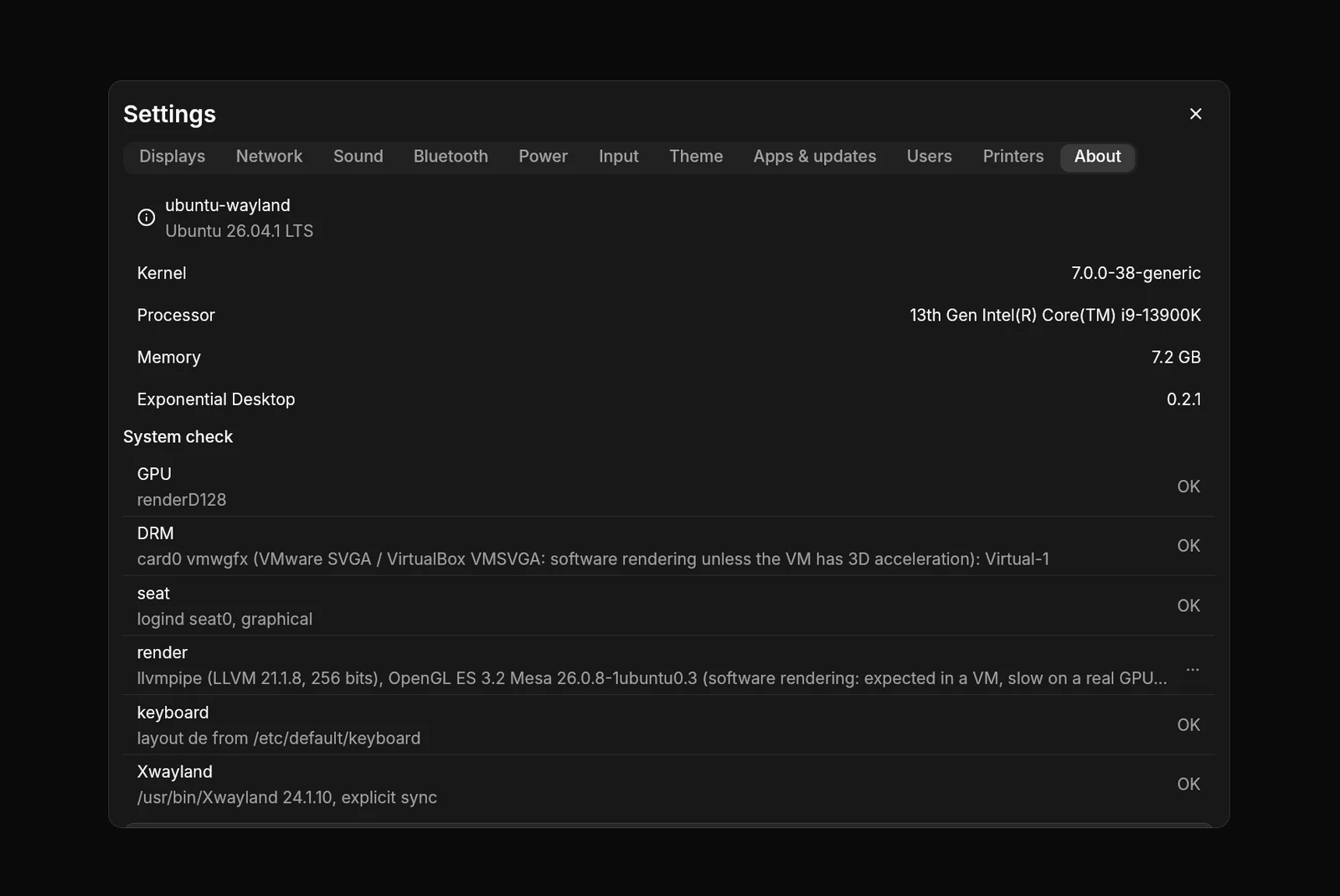
It runs from any desktop and checks the GPU and its render node, the displays, the seat, what EGL renders with, the keyboard layout, Xwayland and its version, and on NVIDIA that nvidia-drm.modeset is on, the driver’s GBM library is installed and the driver has explicit sync.
If it does not start
Section titled “If it does not start”The screen says why and what happens next. A crash restarts the compositor; three quick crashes in a row bring the session back in safe mode. Ctrl+Alt+F3 gives a text login; journalctl --user -b has the session’s logs.