The board
A board is a list of issues grouped by status. Change status, priority, assignee, labels, and due date inline from the row. Click through for the full detail view.
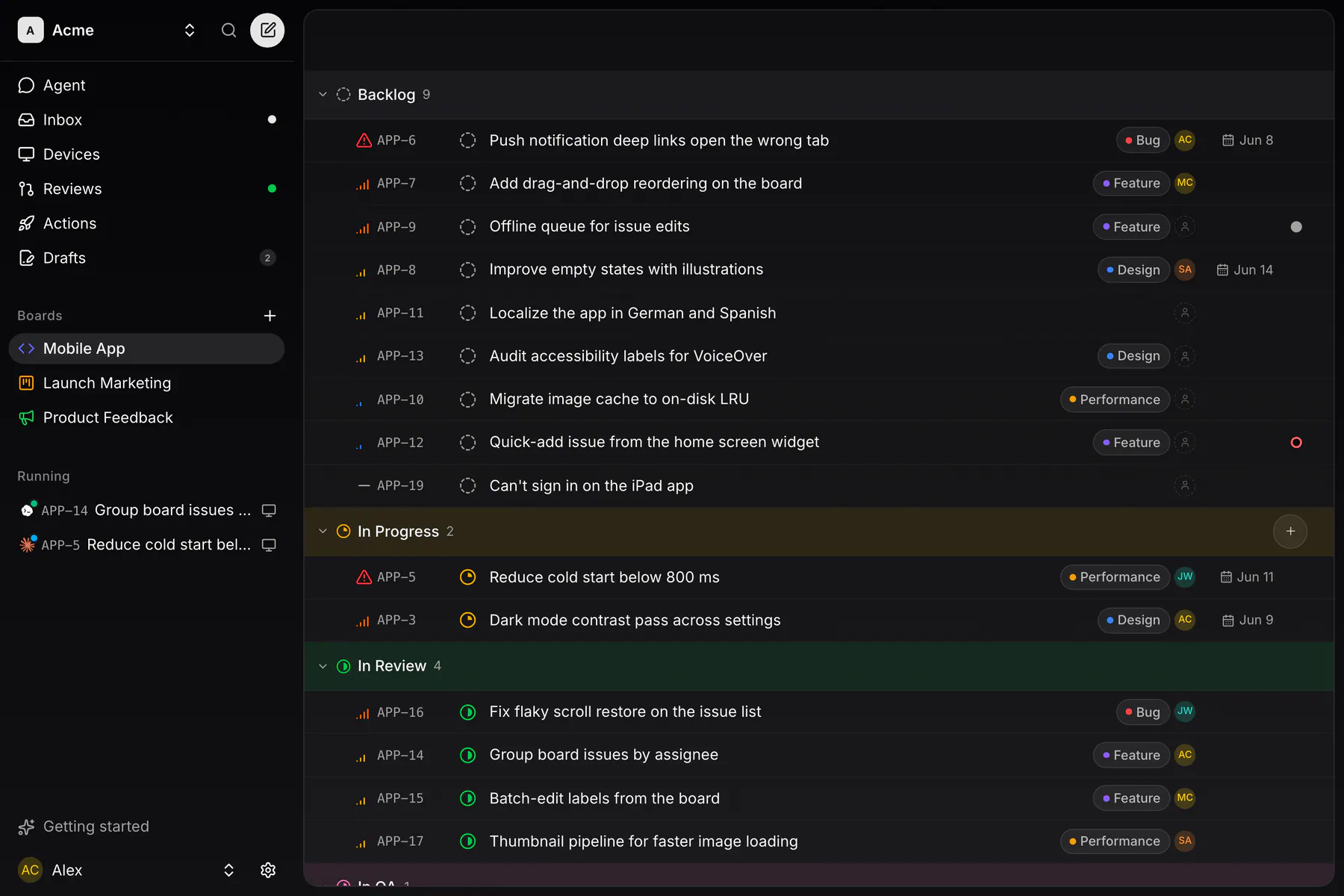
Need to move many issues at once? Click the checkbox gutter to bulk select rows, and the bulk bar sets status, priority, assignee and labels, deletes the selection, or hands the whole thing to an agent as a batch coding run.
Archiving and deleting a board
Owners get two ways to put a board away, both under Team settings → Boards:
- Archive board hides it and all of its issues from the whole team — sidebar, search, pickers, every issue list — without deleting anything. Archived boards collect in an Archived boards card, and Unarchive brings one back exactly as it was. There is no time limit.
- Move to trash is a 48-hour soft delete. The board sits in the Trash card with the time left on it, and Restore works until the purge sweep runs and deletes it (and its attachments) for good.
Either way the board's prefix stays reserved, so nothing renumbers behind you.
Statuses & priorities
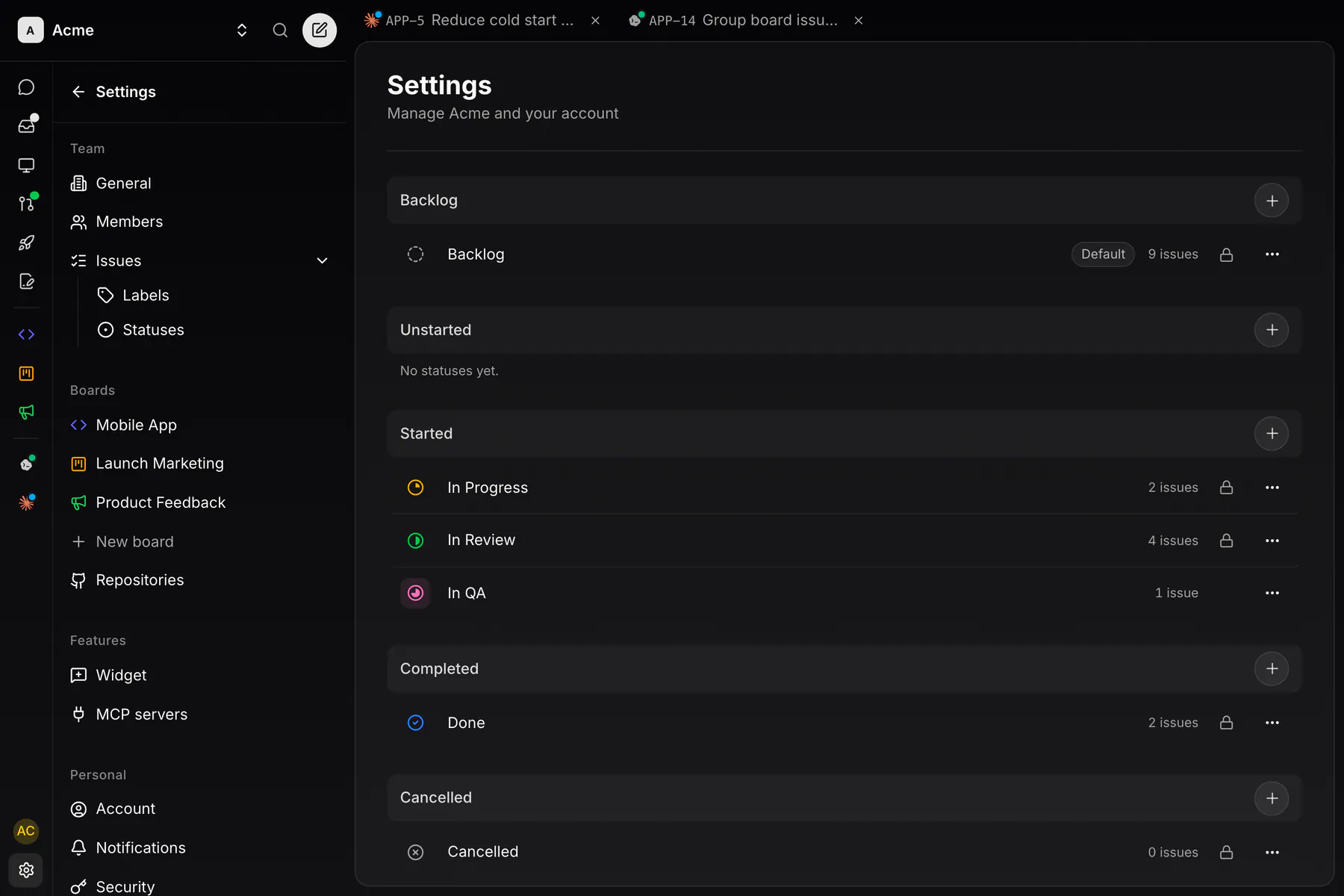
Every team starts with six built-in statuses (Backlog, In Progress, In Review, Done, Cancelled, Duplicate) and adds its own under Team settings → Statuses. Any member manages them; the six builtins are locked (never renamed, recolored or deleted) but can be reordered.
Every status sits in one of six categories (backlog, unstarted, started, completed, cancelled, duplicate), and the category is what the clients reason about: the board groups by it, completed stamps the completion timestamp, and duplicate points at the issue it duplicates. A custom status needs a name, a color and a category; started caps at four. No builtin lives in unstarted — it starts empty on every team and reads “No statuses yet.” until you add one.
Priorities are Urgent, High, Medium, Low, or none. An optional due date shows on the row with a calendar marker as it approaches.
Writing issues
Descriptions and comments are GitHub-flavored markdown, and the same text renders identically on web, iOS, Android, and desktop, with no client-specific dialects. Supported and round-trippable:
- Inline: bold, italic, strikethrough, and
inline code. - Blocks: headings H1–H3, bullet and ordered lists, task lists (
- [ ]/- [x], checkable from any client), blockquotes, tables, and fenced code blocks. - Links and images: paste or drop an image straight into the editor; it uploads as an attachment and embeds in place, pre-sized so nothing jumps while loading.
## Repro
1. Open the board on a **narrow** viewport
2. Drag an issue between columns

## Acceptance
- [ ] Drop indicator visible while dragging
- [x] Board scrolls when dragging near the edge

```ts
// the culprit — offset ignores the scrolled container
const y = event.clientY - rect.top
```
Tables
Tables render as a real grid and are edited in place. On the web and in the desktop IDE, hovering a table reveals a + on each axis to append a row or column, and clicking a row or column head opens its menu: Insert column left / right, Move column left / right, Delete column (and the row equivalents), plus Delete table. On a phone you edit cells directly, and Delete table is on the keyboard bar. Tables live at the top level of a document: one nested in a list item or a quote is lifted out when the text round-trips.
Emoji
An emoji picker sits on the toolbar and the comment composer, and typing : opens the same catalog as a typeahead, with your recents first. Emoji are inserted as plain unicode, never as a :shortcode:, so they read the same everywhere the markdown ends up.
Mentions & refs
@-mentions
Type @ in any description or comment editor and an autocomplete offers your teammates. A mentioned member is notified and auto-subscribed to the issue, and their mention renders as a name pill on every client.
#-issue references
Type # and pick an issue, or just write #EXP-42. When the identifier resolves to an issue in the same team, every client renders it as a clickable pill that jumps straight to that issue; hovering one on web or the desktop shows a preview card with its title, status, priority and labels, and tapping one on mobile does the same. Unknown identifiers stay plain text, so pasting logs or commit messages never produces broken links.
Issue detail
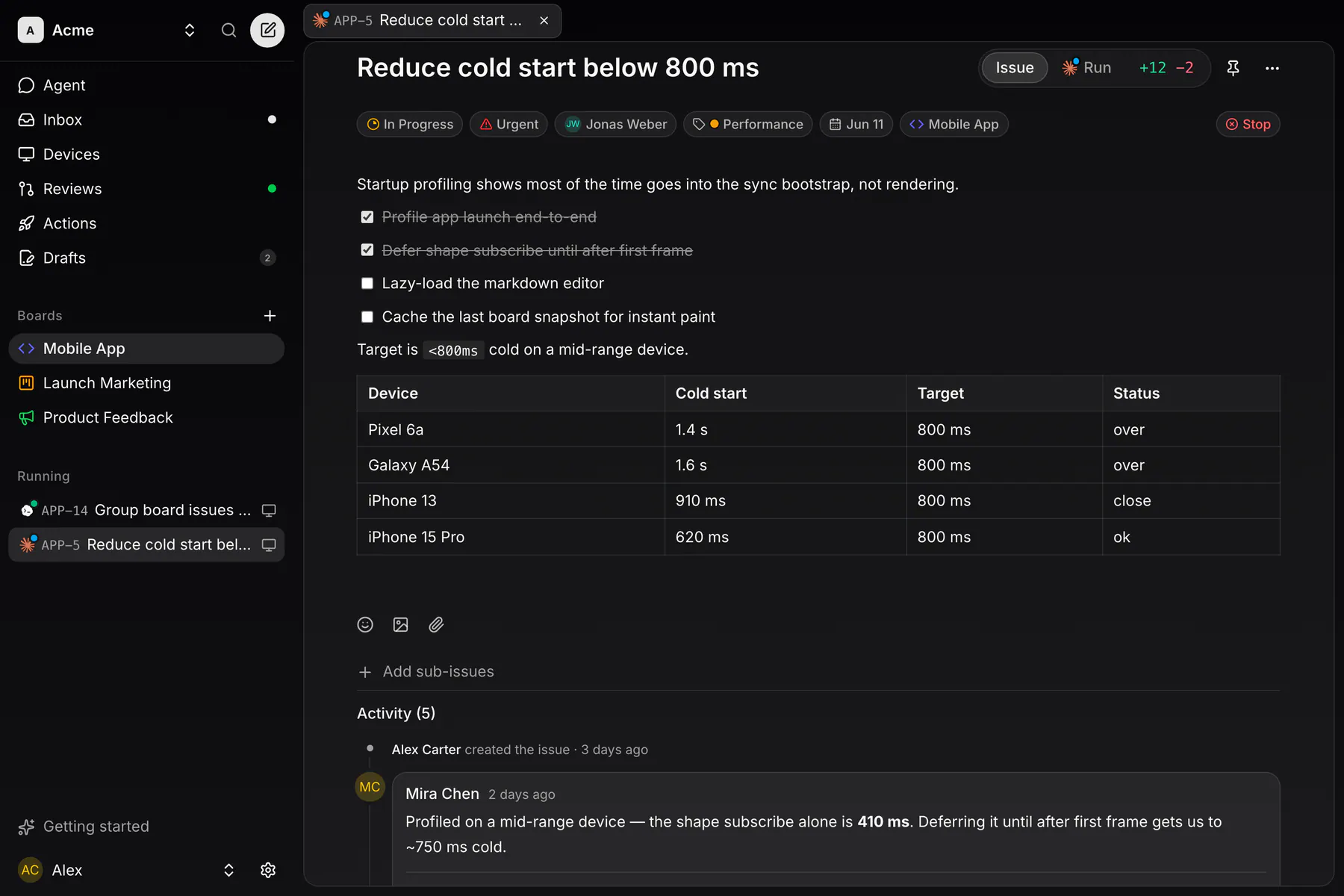
The full-page view puts the description front and center. On web and desktop a fixed header holds the title, with the pin and the … menu (Copy link, Add relation, Delete) on the same line. Under it, a tray holds the properties (status, priority, assignee, labels, due date, board) and ends in the coding action: Start coding, Stop or Resume, with Merge PR beside it while a pull request is open. The description follows, then this issue's relations, then the conversation. Once the issue has a run, the header gains an Issue | Run switch, and the run face keeps the very same header. On web and desktop the content area is a rounded card floating on a darker ground; phones run full-bleed.
Relations
Related issues sit under the description as plain group headings — Sub-issues (with a done/total counter), Parent, Blocked by, Blocks, Duplicate of, Duplicated by, Related — and an issue with none shows nothing at all.
Add relation in the … menu offers Parent of, Sub-issue of, Blocking, Blocked by, Duplicate of and Related to, then a picker for the other issue; the issue list's context menu offers the same, and on iOS and Android the list lives in the properties sheet. Add sub-issues, right under the groups, opens a small composer that files a new issue already parented to this one. Writing #EXP-42 in a description or comment links the two issues as related on its own, and marking an issue as a duplicate shows up here too. Every link shows on both issues, and adding or removing one lands in both activity feeds.
Activity and comments
The activity timeline interleaves comments with events: issue created, status changes, label changes, assignments, priority changes, relations, PR opened, PR merged — each led by its own icon and ending in its time. You follow an issue automatically when you create it, comment on it, get assigned or get mentioned; there is no subscribe button.
Comments thread one level deep: every comment card ends with a Leave a reply… row. On web and desktop the reply composer opens right there; on iOS and Android the docked composer switches to Replying to, with an × back to a plain comment. Replies sit under their comment with a smaller avatar and edit and delete like any comment. A comment an agent posted over MCP says via MCP in its header.
Comments carry attachments, not just markdown: Add image and Attach files in the composer upload on send, images render as previews under the comment body and other files as chips, and editing a comment adds or removes them.
Notifications
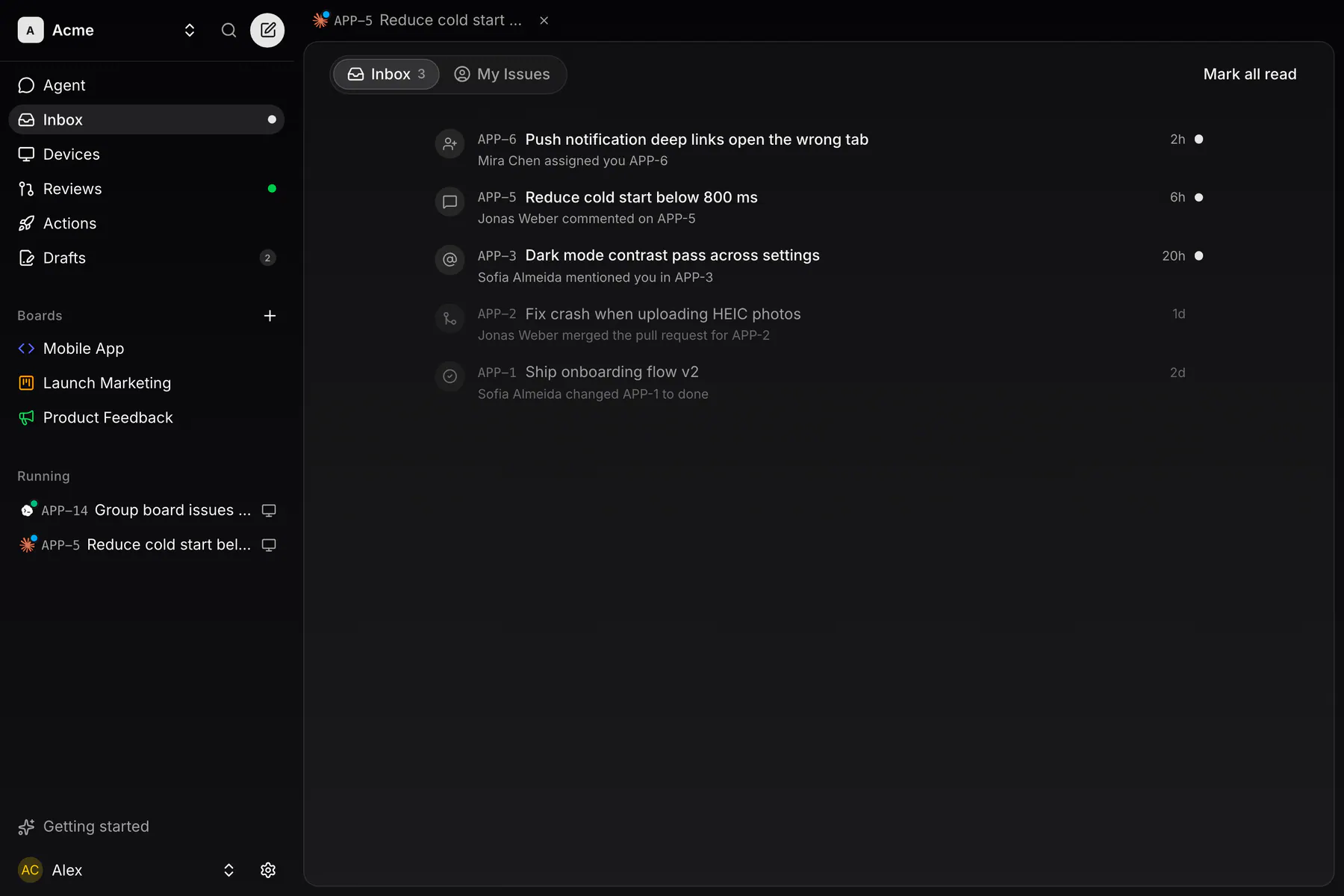
The inbox collects everything addressed to you: assignments, comments on subscribed issues, @-mentions, PR opened / merged, and status changes.
On iOS and Android the same events arrive as push notifications the moment they happen. The desktop app can raise real OS notifications for them too: its own Settings → Notifications pane has a Desktop notifications switch, per machine, and the per-type switches below it apply to those as well. Nothing notifies you about your own actions, or about a PR your own agent opened.
The daily email digest
Email is push-first, never a firehose: there are no per-event notification emails. Notifications still unread bundle into one digest a day, sent at a local hour you choose (08:00 by default). Read them in the app and no email ever comes.
Tune it under Settings → Notifications: per-type preferences, the send hour, and an hourly cadence if once a day is too slow. Every digest carries a one-click unsubscribe.
Branches & PRs
An issue that gets coded maps to one branch (exp/<IDENTIFIER>, e.g. exp/EXP-42) and one linked pull request. The PR state (open, merged) is tracked on the issue automatically.
The base branch
A board picks the branch its work starts from. The board create and settings forms have one Repository select (No repository, the connected repos, or Connect another repository…) and a Branch picker under it. The repository's own default is tagged, and picking it clears the pin. Without a board pin, the team's per-repository default-branch override applies, and without that, GitHub's default — resolved live, never assumed.
PR automation
What a PR event does to the issue is a per-team setting: Team settings → Statuses → PR automation. Out of the box, opening the PR moves the issue to In Review and merging it completes the issue to Done. Point either event at any of your team's statuses instead, or set it to Do nothing and move issues by hand.
The same card carries one more switch, “When a pull request merges, end its coding sessions”, on by default. Turn it off and a merge leaves live coding sessions running. Either way, the session that merged its own pull request always keeps running.
The one exception: batch coding runs. A batch works several issues in one session on a shared exp/batch-<id> branch and opens one combined PR linked to every issue in the batch. Merging that single PR completes them all.