What an action is
An action is a markdown prompt owned by the team, run as a full interactive agent session on a member's own machine. Where a coding session starts from an issue, an action starts from a saved instruction. That gives the work that isn't issue-shaped a home too: ship a release, run a migration, restart a service, review a pull request.
An action can name a repository, in which case the run gets its own git worktree on its own branch (exp/<slug>-<id>) — never the trunk checkout. Without a repository it runs in a scratch directory. Either way it runs on the member's own device, with their own agent subscription. Nothing executes on Exponential's servers, and no team secrets are involved.
An action runs on demand, or by itself on a schedule or an event: see Triggers.
Authoring
There is no form to fill in. You author an action by running the built-in Create action. Describe what it should do and the agent writes it, registering it for the team through the MCP API. Editing and deleting are owner-only; running is open to every member.
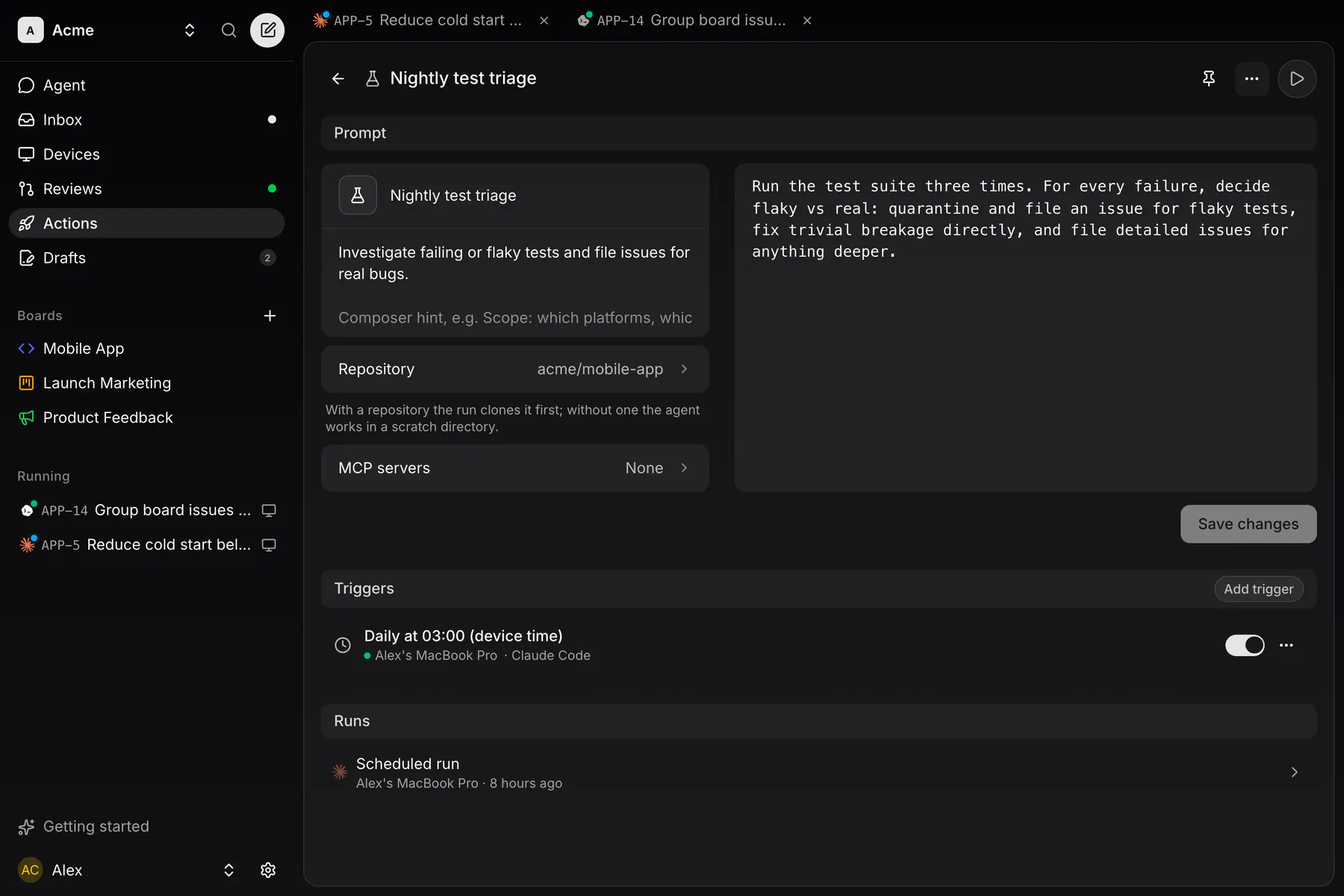
Opening an action in the Actions list opens its page. It has three parts:
- Prompt: the name, icon, description, composer hint, repository and the markdown prompt itself.
- Triggers: what starts the action without you, covered below.
- Runs: every run of the action, newest first.
The desktop app and wide web show the three as sections of one page; phones show them as tabs.
Inputs
An action can declare up to 10 typed pick inputs, each optional or required. Whoever runs it picks them, and the values are appended to the prompt:
repo: one of the team's connected repositories.board: one of the team's boards.pr: an issue with an open pull request.icon: a glyph from the shared icon set.
There is no free-text input type. Whatever the runner wants to add goes into the composer's Additional instructions box, whose hint text is the action's prompt placeholder; it lands in the run's prompt under a heading of that name.
Running one
On the desktop, actions live in their own rail entry, and the Agent page composer takes one as a chip (the ▶ button), with the same agent, model and effort pickers as an issue run.
From the web (Actions in the sidebar) or the mobile apps, Run hands the action to one of your online desktops and drops you into the live session, the same watch-and-steer view as a coding run. All four clients edit actions in full; the writes are still owner-only. A run that opens a pull request shows Merge in its session view, and the PR is listed under Agent runs in Reviews.
Starting from scratch? A curated catalog of suggestions, seeds that prefill the creator run, some carrying a trigger, sits behind the lightbulb next to New action (on desktop web it is Getting started's Suggested actions tab; on the phone it is the Suggestions tab beside Actions).
Triggers
A trigger starts an action without anyone pressing Run. It is a schedule or an event, bound to one device, with its own on/off switch. Triggers live in the Triggers part of the action's page, and adding, editing and deleting them is owner-only.
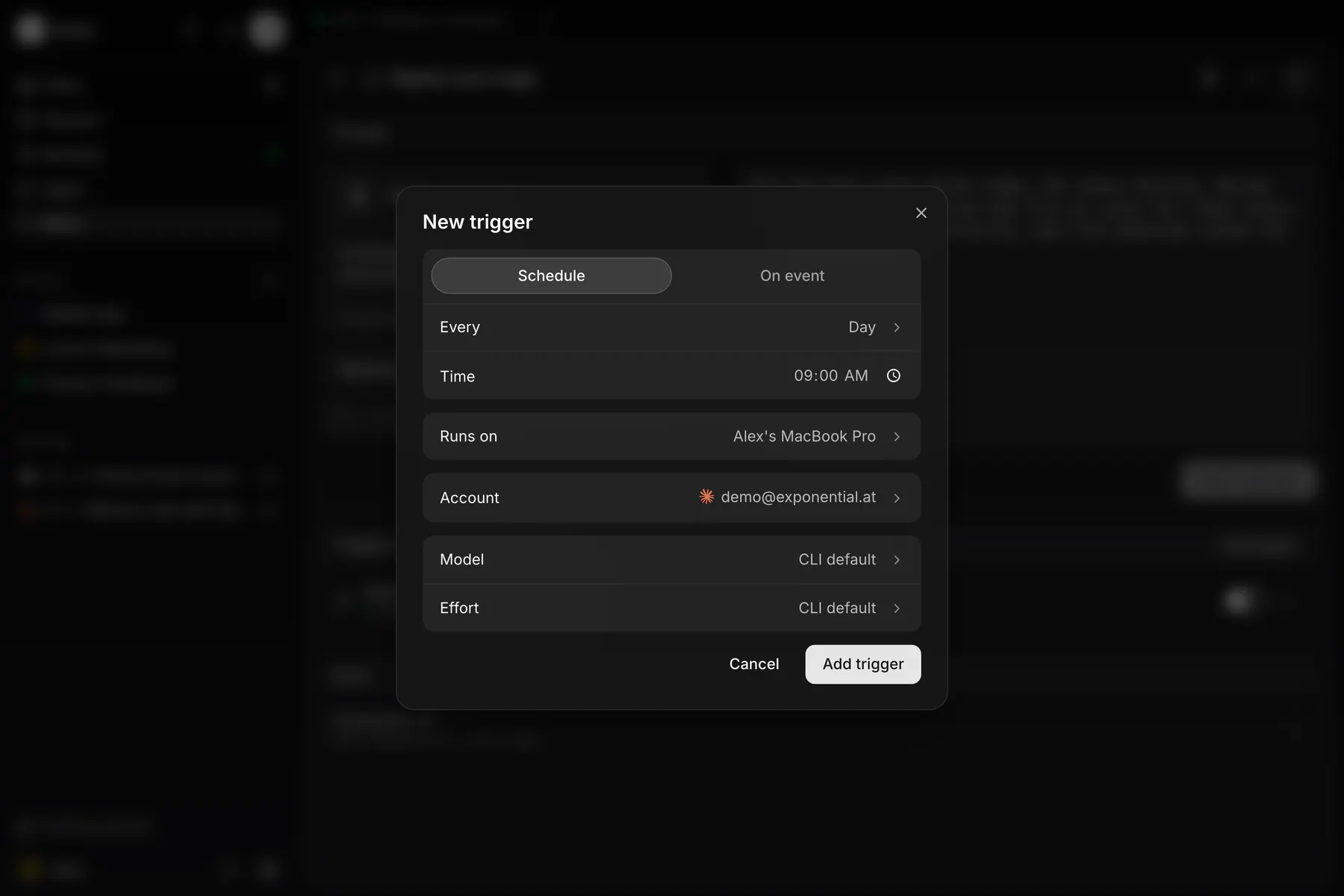
Add trigger opens the form:
- Schedule: daily, weekly on a weekday, or monthly on a day from 1 to 28, at a time in the device's local time.
- Event: an issue is created, its status, assignee or priority changes, a label is added, or a pull request is opened or merged. Board, label, priority and status filters narrow it.
- Device: the desktop app or CLI daemon that starts the run.
- Account, model and effort: optional pins for the run.
Triggers run locally. There is no server scheduler: the bound device starts the run itself. If it was offline at a scheduled time, it catches up with one run when it is back. Withdrawing a shared machine from a team pauses the triggers bound to it.
In the Actions list, a row shows a clock while its action has a schedule trigger and a bolt while it has an event trigger; the glyph is muted while no trigger of that kind is switched on. A triggered run carries the same glyph under Runs and stays out of the Agent page's Recent list.
The builtins
Two builtins ship with the product and can be picked like any action; the composer's own Chat is the third way to run without one. None of them can be edited or deleted, and none carries triggers:
- Create action: the authoring flow above. Takes a description, plus an optional name, repository and icon. It is the New action button rather than a row in the list.
- Fix merge conflicts: takes a pull request, checks out its branch in its own worktree, rebases onto the base branch, resolves the conflicts, force-pushes, and merges. It doesn't clutter the actions list — you meet it as the Fix conflicts button that replaces Merge on the Reviews queue and in the session view when a merge fails on conflicts.
Chat is not an action you pick: it is the Agent page composer with nothing chipped, a free prompt with no issue attached and no repository required. With a repository picked the run gets its own exp/chat-<id> worktree, without one it runs in a scratch directory. Either way it steers like any other session.
Actions and their triggers are scriptable too. See the exponential_actions_* tools in the MCP reference.